Case Study
Building a Dependency-Aware Salesforce Sync Pipeline
A serverless data sync system that moved selected Salesforce objects into an internal MySQL database while preserving relationships, transforming object shapes, and detecting inserts, updates, and deletes table by table.
Project Overview
Salesforce and the internal platform both contained important business data, but they did not model that data in the same way. The goal was to sync a selected set of Salesforce SObjects into the application's RDS MySQL database without breaking existing workflows or database relationships.
- Source system: Salesforce SObjects
- Destination: Application data in RDS MySQL
- Runtime: Serverless AWS Lambda orchestration
- Role: Technical lead / senior engineer for sync architecture, transformation, comparison, and sequencing logic
The Challenge
This was not a simple copy-paste integration. Salesforce and the internal application had different object shapes, different naming conventions, and different relationship models. Every SObject needed to become an application row through a dedicated transform function.
The harder part was relationships. Salesforce records referenced other Salesforce records by SFDC IDs, while application tables used MySQL primary keys and foreign keys. Before inserting a child row, the sync often had to find the corresponding internal database ID for a parent record.
- New Salesforce records needed to become new application rows.
- Existing application rows needed column-level comparison and selective updates.
- Rows no longer present in Salesforce had to be detected and deleted safely.
- Parent tables had to sync before child tables so foreign keys could resolve correctly.
My Process
I split the problem into two layers. The first layer decided when tables should run. The second layer decided what changed inside each table.
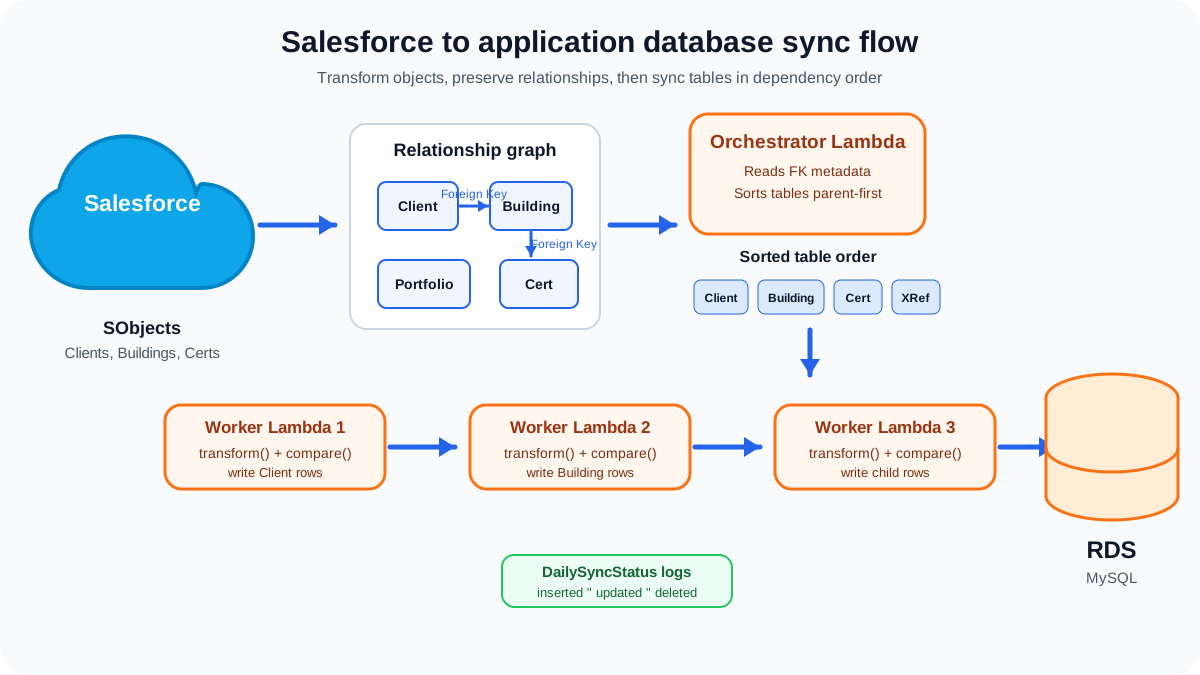
For table order, the sync inspected MySQL foreign-key metadata from `information_schema.KEY_COLUMN_USAGE`, built a dependency graph, and produced a parent-first sequence. That meant entities like clients, buildings, portfolios, certifications, and cross-reference tables could be processed in a safe order without hand-maintaining a fragile list.
function orderTablesForSync(tables: TableMeta[]) {
  const ordered: string[] = [];

  while (ordered.length < tables.length) {
    const next = tables
      .filter((table) => !ordered.includes(table.name))
      .find((table) =>
        table.dependsOn.every((parent) => ordered.includes(parent))
      );

    ordered.push(next.name);
  }

  return ordered;
}
For row-level changes, every table had a sync function that fetched Salesforce rows, fetched the matching application rows, resolved any required internal IDs into `relationshipContext`, transformed Salesforce rows into application DTOs, compared before/after values, and recorded pending deletes.
Solution
The final design used a serverless orchestrator-worker pattern. The first Lambda created a daily sync job, calculated table order, wrote one `DailySyncStatus` row per table, and invoked the worker Lambda. Each worker picked the next unfinished table, completed its upsert, wrote metrics, and invoked the next worker until the upsert phase was finished.
Deletions were deliberately delayed. Each upsert stored `idsToDelete`, but the actual delete phase ran only after all table upserts had completed successfully. That reduced the chance of deleting rows before dependent records had been reconciled.
async function upsertTable<T>(table: SyncTable<T>) {
  const sfdcRows = await table.fetchFromSalesforce();
  const existingRows = await table.fetchFromAppDb();

  const relationshipContext = await table.resolveForeignKeys(sfdcRows);
  const beforeBySfdcId = keyBy(existingRows, table.sfdcIdColumn);

  const rowsToInsert: T[] = [];
  const rowsToUpdate: Partial<T>[] = [];

  for (const sfdcRow of sfdcRows) {
    const next = table.transform(sfdcRow, relationshipContext);
    const before = beforeBySfdcId[next[table.sfdcIdColumn]];

    if (!before) rowsToInsert.push(next);
    else {
      const delta = table.compare(next, before);
      if (Object.keys(delta).length) rowsToUpdate.push(delta);
    }
  }

  const idsToDelete = diffBySfdcId(existingRows, sfdcRows);

  return { rowsToInsert, rowsToUpdate, idsToDelete };
}- Transform functions converted Salesforce shapes into application DTOs.
- Compare functions handled per-column differences, including custom date, datetime, and decimal comparison rules.
- relationshipContext carried resolved internal IDs needed to maintain primary-key and foreign-key relationships.
- DailySyncStatus gave every table a durable audit trail with insert, update, and delete counts.
Extensibility
A new SObject could be added without rewriting the whole pipeline. The developer needed to add the application entity, add the SObject fetch, define a transform function, define a compare function, and register the entity in the sync list. The orchestration logic could then pick it up, calculate dependencies, and include it in the job.
That separation mattered because each table had its own quirks, but the overall sync lifecycle stayed consistent: fetch, resolve relationships, transform, compare, insert/update, store deletes, and log the outcome.
Results and Impact
The sync turned a fragile cross-system data problem into a repeatable daily job. Salesforce could remain the source for selected business objects, while the internal platform received data in the shape its own application needed.
- Table sequencing was derived from actual database relationships instead of hard-coded intuition.
- Per-table logs made it possible to inspect inserted, updated, and deleted row counts after each run.
- Transform and compare functions made each SObject explicit and testable.
- Serverless worker chaining allowed the sync to continue table by table in a Lambda-friendly way.
await dailySyncStatus.update({
  tableName,
  insertCount: rowsToInsert.length,
  updateCount: rowsToUpdate.length,
  idsToDelete,
  upsertFinishedOn: Date.now(),
});
Reflections
The smartest part of this work was treating the database schema as a source of truth. Instead of relying only on developer memory, the sync read the FK graph and used it to decide table order. That made the system easier to extend as more Salesforce objects were added.
If I were extending this further, I would add a visual run explorer for the sync logs: a page that shows the table sequence, each Lambda task, row counts, error messages, and links to CloudWatch logs for faster investigation.