Case Study
Building a Reliable Field Survey App for Low-Connectivity Environments
A mobile-first PWA for survey engineers capturing building assessments in low-connectivity environments, designed to preserve answers and hundreds of photos without slowing field work.
Project Overview
This project was a mobile-first Progressive Web App for a building certification platform. Survey engineers used it on phones and desktops to assess large commercial buildings, answer structured survey questions, and capture photographic evidence while moving through the property.
- Client type: Building certification platform
- Platform: Angular, Ionic, Capacitor, PWA, IndexedDB, Web Workers, S3 signed URLs
- Role: Technical lead / senior engineer for offline-first image capture and sync architecture
- Scale: Around 80 questions, 6-hour survey sessions, and up to 600 photos in a single survey
The Challenge
The core requirement was simple to state but difficult to execute: survey engineers needed to keep working even when the building had poor or no internet connectivity. A single survey could involve a large building with 50 floors, multiple basements, elevators, and service areas where connectivity changed constantly.
The app could not slow the engineer down while they were answering questions and capturing evidence. At the same time, it could not risk losing survey answers or photos. If an engineer captured 600 photos during a visit, every image needed to be accounted for. Some images might reach S3 immediately, some might be stuck on the device for hours, and the survey still had to make sense at the end.
A single survey session could last 6 hours and involve 500-600 images. Memory management became a product requirement, not just a technical nice-to-have. The phone might also need to hold multiple surveys at the same time, so local storage had to be visible, bounded, and recoverable.
- The app needed to work offline as a PWA.
- Photo capture needed immediate UI feedback through a thumbnail.
- Answers and images had to survive weak internet, reloads, battery loss, and memory pressure.
- Multiple surveys could exist on the same phone, each with its own local photos, thumbnails, and sync state.
- Final submission needed to resume from the current state instead of blindly re-uploading everything.
My Process
I approached the problem as a local-first workflow rather than an upload-first workflow. The user action had to complete locally first: capture the photo, show the thumbnail, update the survey state, and preserve enough data that the network could fail without breaking the survey.
From there, I separated the heavier work into a background pipeline: image compression, IndexedDB persistence, signed URL requests, thumbnail upload, and full photo upload. In other words, the app behaved less like a form and more like a tiny field-data operating system running inside the browser.
- I used local storage for survey state and IndexedDB for offline storage of photo and thumbnail files.
- I used Jimp to compress large photos down to a practical 1080px target before upload.
- I used Web Workers so image processing and upload work did not block the survey UI.
- I built a task manager service to schedule pending image work across available workers.
- I designed the submission flow to inspect the survey JSON and upload only missing photo or thumbnail assets.
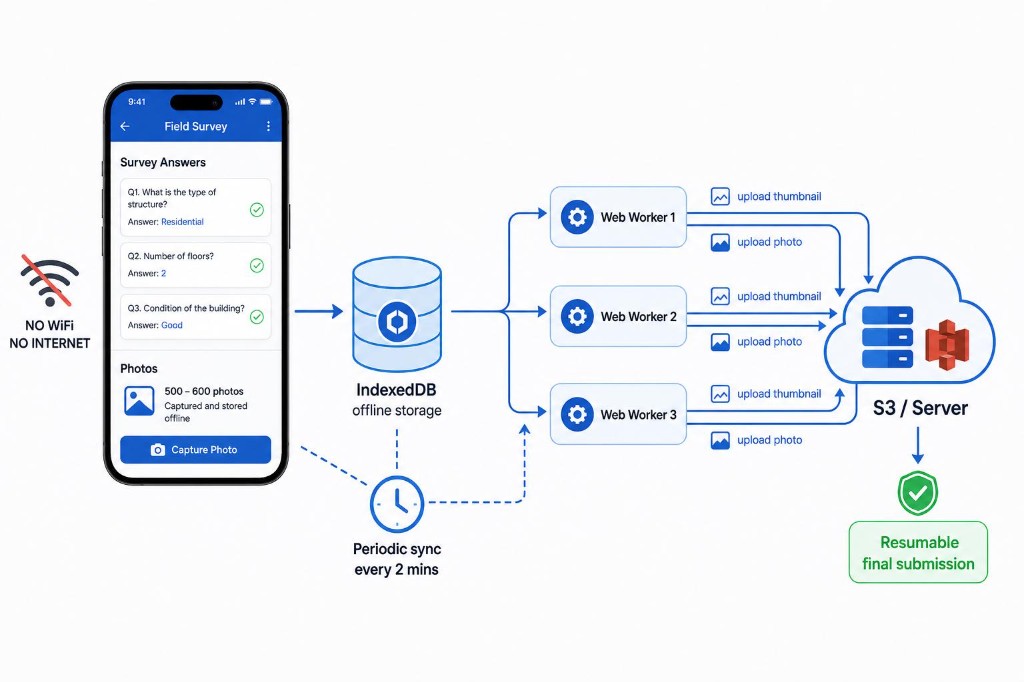
Solution
We designed the app around a local-first capture pipeline. The PWA accepted survey answers and photos immediately, saved critical data locally, and treated network upload as a background process that could succeed now, later, or during final submission.
async function capturePhoto(file: File) {
  // UI feedback first. Network can catch up later.
  const thumbnail = await createThumbnail(file);
  showThumbnail(thumbnail);

  // Persist evidence before attempting upload.
  await indexedDb.photos.put(file);
  await indexedDb.thumbnails.put(thumbnail);

  taskManager.enqueue(file);
}
When an engineer selected or captured photos, the app created upload tasks and immediately generated a local thumbnail. That thumbnail was saved and displayed in the survey UI, so the engineer had instant feedback that the photo was captured successfully. That tiny thumbnail mattered: it told the engineer, "you got the evidence, keep moving."
Behind the scenes, the task manager picked up the work. It calculated a safe number of workers from device capabilities, sent each image task to a worker, and assigned the next pending task when a worker finished. While the user continued the survey, workers compressed photos, saved them to IndexedDB, requested signed URLs, and uploaded both thumbnails and full images to S3.
- Full images and thumbnails were stored separately in IndexedDB so the UI could remain responsive while preserving the original evidence.
- A two-minute background sync job ran while the engineer was checked into a survey, reducing image buildup whenever connectivity was available.
- Each photo in the survey JSON tracked whether its photo URL and thumbnail URL had reached the server.
- The final submission process uploaded only assets that were still missing server URLs.
const TWO_MINUTES = 2 * 60 * 1000;

function startSurveySyncJob(surveyId: string) {
  setInterval(async () => {
    await syncSurveyJson(surveyId);

    const pending = await findUnsyncedPhotos(surveyId);

    // Wake workers only when there is useful work.
    taskManager.wakeSleepingWorkers(pending);
  }, TWO_MINUTES);
}
Storage and Recovery
We also added a storage screen because offline systems need visibility. This became a critical fallback: survey engineers could forget how much evidence the app was holding after a long day in the field, and the storage screen gave them a clear picture of what was still on the device.
This page gave users and support teams a recovery path. If something unusual happened, such as battery loss or browser memory pressure, the user could return to the app, inspect what was still local, manually sync the survey, and clear storage only after the data had safely reached the server.
- How many photos were stored per survey.
- How many photos had already synced to the server.
- How many photos were still pending upload.
- How much device storage the app was currently using.
- Actions to sync survey data or clear storage after sync.
Results and Impact
The result was a field survey app that matched the reality of large buildings. Engineers could keep answering questions and collecting evidence without waiting for the network, while the system continuously worked in the background to compress, persist, upload, and reconcile survey data.
- Survey engineers could continue working through poor-connectivity areas without losing progress.
- The app could support surveys with hundreds of photos while still giving immediate thumbnail feedback.
- Final submission became resumable because already-uploaded images were skipped.
- The storage screen reduced the risk of hidden data buildup or accidental data loss by showing exactly what the app still held.
async function submitSurvey(surveyId: string) {
  const pending = await findUnsyncedPhotos(surveyId);

  // Resumable: only upload missing evidence.
  const result = await uploadMissingAssets(pending);

  if (result.failed.length) {
    throw new Error("Some photos are still pending. Please retry sync.");
  }

  await submitSurveyJson(surveyId);
  await clearLocalSurveyStorage(surveyId);
}
Reflections
The biggest lesson from this project was that offline support is not a single feature. For this workflow, it affected capture UX, storage limits, background processing, upload retries, final submission, and support tooling. The app had to make progress locally first, then reconcile with the server whenever the network allowed it.
If I were extending this further, I would invest more in visual observability for the sync pipeline: clearer per-image status, better queue-level progress, and a diagram that helps users and support teams understand exactly where a photo is in the flow.